Strings in Lisp
In Common Lisp a string is a one-dimensional array of characters. A one-dimensional array is also known as a vector. Lisp has a more general notion of a sequence which includes vectors and lists. We will see more about sequences later. Because a string is a kind of sequence, all functions which operate on sequences also operate on strings. Here we will deal with functions which are restricted to strings. Later we will look at the more general array or sequence functions.
The ASDF library (version 3), which is included with almost all Common Lisp
implementations, includes Utilities for Implementation- and OS- Portability
(UIOP), which defines functions to work on strings (strcat, string-prefix-p,
string-enclosed-p, first-char, last-char, split-string, stripln).
Some external libraries available on Quicklisp bring some more functionality or some shorter ways to do.
- str defines
trim,words,unwords,lines,unlines,concat,split,shorten,repeat,replace-all,starts-with-p,ends-with-p,blankp,emptyp, … cl-ppcrecan come in handy, for exampleppcre:replace-regexp-all. See the regexp section.
Last but not least, when you’ll need to tackle the format construct, don’t miss
the following resources:
- the official CLHS documentation
- a quick reference
- the list of all format directives at the end of this document.
- plus a Slime tip: type
C-c C-d ~plus a letter of a format directive to open up its documentation. Use TAB-completion to list them all.
Creating strings
A string is created with double quotes, all right, but we can recall these other ways:
- using
format nildoesn’t print but returns a new string (see more examples offormatbelow):
(defparameter *person* "you")
(format nil "hello ~a" *person*) ;; => "hello you"
make-string countcreates a string of the given length. The:initial-elementcharacter is repeatedcounttimes:
(make-string 3 :initial-element #\♥) ;; => "♥♥♥"
Accessing Substrings
As a string is a sequence, you can access substrings with the SUBSEQ function. The index into the string is, as always, zero-based. The third, optional, argument is the index of the first character which is not a part of the substring, it is not the length of the substring.
CL-USER> (defparameter *my-string* (string "Groucho Marx"))
*MY-STRING*
CL-USER> (subseq *my-string* 8)
"Marx"
CL-USER> (subseq *my-string* 0 7)
"Groucho"
CL-USER> (subseq *my-string* 1 5)
"rouc"
You can also manipulate the substring if you use SUBSEQ together with SETF. This might remind you of Python assignment of sublists but note how Python strings are immutable but Common Lisp strings are mutable.
CL-USER> (defparameter *my-string* (string "Harpo Marx"))
*MY-STRING*
CL-USER> (subseq *my-string* 0 5)
"Harpo"
CL-USER> (setf (subseq *my-string* 0 5) "Chico")
"Chico"
CL-USER> *my-string*
"Chico Marx"
But note that the string isn’t “stretchable”. To cite from the HyperSpec: “If the subsequence and the new sequence are not of equal length, the shorter length determines the number of elements that are replaced.” For example:
CL-USER> (defparameter *my-string* (string "Karl Marx"))
*MY-STRING*
CL-USER> (subseq *my-string* 0 4)
"Karl"
CL-USER> (setf (subseq *my-string* 0 4) "Harpo")
"Harpo"
CL-USER> *my-string*
"Harp Marx"
CL-USER> (subseq *my-string* 4)
" Marx"
CL-USER> (setf (subseq *my-string* 4) "o Marx")
"o Marx"
CL-USER> *my-string*
"Harpo Mar"
Accessing Individual Characters
You can use the function CHAR to access individual characters of a string. CHAR can also be used in conjunction with SETF.
CL-USER> (defparameter *my-string* (string "Groucho Marx"))
*MY-STRING*
CL-USER> (char *my-string* 11)
#\x
CL-USER> (char *my-string* 7)
#\Space
CL-USER> (char *my-string* 6)
#\o
CL-USER> (setf (char *my-string* 6) #\y)
#\y
CL-USER> *my-string*
"Grouchy Marx"
Because strings are arrays and thus sequences, you can also use the more
generic functions aref and elt (which mighe be less efficient that CHAR since
they are more general).
CL-USER> (defparameter *my-string* (string "Groucho Marx"))
*MY-STRING*
CL-USER> (aref *my-string* 3)
#\u
CL-USER> (elt *my-string* 8)
#\M
Each character in a string has an integer code. The range of recognized codes and Lisp’s ability to print them is directed related to your implementation’s character set support.
Here are some examples in SBCL of UTF-8 which encodes characters as 1 to 4 8-bit bytes. The first example shows a character outside the first 128 chars, or what is considered the normal Latin character set. The second example shows a multibyte encoding (beyond the value 255). Notice the Lisp reader can round-trip characters by name.
CL-USER> (code-char 200)

#\LATIN_CAPITAL_LETTER_E_WITH_GRAVE
CL-USER> (char-code #\LATIN_CAPITAL_LETTER_E_WITH_GRAVE)

200
CL-USER> (code-char 2048)
#\SAMARITAN_LETTER_ALAF

CL-USER> (char-code #\SAMARITAN_LETTER_ALAF)
2048
Check out the UTF-8 Wikipedia article for the range of supported characters and their encodings.
Remove or replace characters from a string
There’s a slew of (sequence) functions that can be used to manipulate a string and we’ll only provide some examples here. See The Sequences Dictionary in the HyperSpec for more.
remove one character from a string:
CL-USER> (remove #\o "Harpo Marx")
"Harp Marx"
CL-USER> (remove #\a "Harpo Marx")
"Hrpo Mrx"
CL-USER> (remove #\a "Harpo Marx" :start 2)
"Harpo Mrx"
CL-USER> (remove-if #'upper-case-p "Harpo Marx")
"arpo arx"
Replace one character with substitute (non destructive) or replace
(destructive):
CL-USER> (substitute #\u #\o "Groucho Marx")
"Gruuchu Marx"
CL-USER> (substitute-if #\_ #'upper-case-p "Groucho Marx")
"_roucho _arx"
CL-USER> (defparameter *my-string* (string "Zeppo Marx"))
*MY-STRING*
CL-USER> (replace *my-string* "Harpo" :end1 5)
"Harpo Marx"
CL-USER> *my-string*
"Harpo Marx"
Concatenating Strings
The name says it all: concatenate is your friend. Note that this is a generic
sequence function and you have to provide the result type as the first
argument.
CL-USER> (concatenate 'string "Karl" " " "Marx")
"Karl Marx"
CL-USER> (concatenate 'list "Karl" " " "Marx")
(#\K #\a #\r #\l #\Space #\M #\a #\r #\x)
With UIOP, use strcat:
CL-USER> (uiop:strcat "karl" " " "marx")
or with the library str, use concat:
CL-USER> (str:concat "foo" "bar")
Processing a String One Character at a Time
Use the MAP function to process a string one character at a time.
CL-USER> (defparameter *my-string* (string "Groucho Marx"))
*MY-STRING*
CL-USER> (map 'string (lambda (c) (print c)) *my-string*)
#\G
#\r
#\o
#\u
#\c
#\h
#\o
#\Space
#\M
#\a
#\r
#\x
"Groucho Marx"
Or do it with ITER.
(iter (for char in-string "Zeppo")
      (collect char))
Reversing a String by Word or Character
Reversing a string by character is easy using the built-in reverse function (or
its destructive counterpart nreverse).
CL-USER> (defparameter *my-string* (string "DSL"))
*MY-STRING*
CL-USER> (reverse *my-string*)
"LSD"
There’s no one-liner in CL to reverse a string by word (like you would do it in Perl with split and join). You either have to use functions from an external library like SPLIT-SEQUENCE or you have to roll your own solution.
Here’s an attempt with the str library:
(defparameter *singing* "singing in the rain")
(str:unwords (reverse (str:words *SINGING*)))
Dealing with unicode strings
We’ll use here SBCL’s string operations. More generally, see SBCL’s unicode support.
Sorting unicode strings alphabetically
Sorting unicode strings with string-lessp as the comparison function isn’t
what we want:
(sort '("Aaa" "Ééé" "Zzz") #'string-lessp)
With SBCL, use sb-unicode:unicode<:
(sort '("Aaa" "Ééé" "Zzz") #'sb-unicode:unicode<)
Controlling Case
Common Lisp has several functions to control the case of a string.
CL-USER> (string-upcase "cool")
"COOL"
CL-USER> (string-upcase "Cool")
"COOL"
CL-USER> (string-downcase "COOL")
"cool"
CL-USER> (string-downcase "Cool")
"cool"
CL-USER> (string-capitalize "cool")
"Cool"
CL-USER> (string-capitalize "cool example")
"Cool Example"
These functions take the :start and :end keyword arguments so you
can optionally only manipulate a part of the string. They also have
destructive counterparts whose names starts with “N”.
CL-USER> (string-capitalize "cool example" :start 5)
"cool Example"
CL-USER> (string-capitalize "cool example" :end 5)
"Cool example"
CL-USER> (defparameter *my-string* (string "BIG"))
*MY-STRING*
CL-USER> (defparameter *my-downcase-string* (nstring-downcase *my-string*))
*MY-DOWNCASE-STRING*
CL-USER> *my-downcase-string*
"big"
CL-USER> *my-string*
"big"
Trimming Blanks from the Ends of a String
Similarly to Pythons strip methods, Lisp has trim functions string-trim,
string-left-trim and string-right-trim The first argument is a string
containing characters to be trimmed.
CL-USER> (string-trim " " " trim me ")
"trim me"
CL-USER> (string-trim " et" " trim me ")
"rim m"
CL-USER> (string-left-trim " et" " trim me ")
"rim me "
CL-USER> (string-right-trim " et" " trim me ")
" trim m"
CL-USER> (string-right-trim '(#\Space #\e #\t) " trim me ")
" trim m"
CL-USER> (string-right-trim '(#\Space #\e #\t #\m) " trim me ")
Converting between Characters and Strings
You can use coerce to convert a string of length 1 to a character. You can also
use coerce to convert any sequence of characters into a string. You can not use
coerce to convert a character to a string, though — you can use string for
that.
CL-USER> (coerce "a" 'character)
#\a
CL-USER> (coerce (subseq "cool" 2 3) 'character)
#\o
CL-USER> (coerce "cool" 'list)
(#\c #\o #\o #\l)
CL-USER> (coerce '(#\h #\e #\y) 'string)
"hey"
CL-USER> (coerce (nth 2 '(#\h #\e #\y)) 'character)
#\y
CL-USER> (defparameter *my-array* (make-array 5 :initial-element #\x))
*MY-ARRAY*
CL-USER> *my-array*
#(#\x #\x #\x #\x #\x)
CL-USER> (coerce *my-array* 'string)
"xxxxx"
CL-USER> (string 'howdy)
"HOWDY"
CL-USER> (coerce #\y 'string)
#\y can't be converted to type STRING.
   [Condition of type SIMPLE-TYPE-ERROR]
CL-USER> (string #\y)
"y"
Finding an Element of a String
Use find, position, and their …-if counterparts to find characters
in a string, with the appropriate :test parameter:
CL-USER> (find #\t "Tea time." :test #'equal)
#\t
CL-USER> (find #\t "Tea time." :test #'equalp)
#\T
CL-USER> (find #\z "Tea time." :test #'equalp)
NIL
CL-USER> (find-if #'digit-char-p "Tea time.")
#\1
CL-USER> (find-if #'digit-char-p "Tea time." :from-end t)
#\0

CL-USER> (position #\t "Tea time." :test #'equal)
4   ;; <= the first lowercase t
CL-USER> (position #\t "Tea time." :test #'equalp)
0    ;; <= the first capital T
CL-USER> (position-if #'digit-char-p "Tea time is at 5'00.")
15
CL-USER> (position-if #'digit-char-p "Tea time is at 5'00." :from-end t)
18
Or use count and friends to count characters in a string:
CL-USER> (count #\t "Tea time." :test #'equal)
1  ;; <= equal ignores the capital T
CL-USER> (count #\t "Tea time." :test #'equalp)
2  ;; <= equalp counts the capital T
CL-USER> (count-if #'digit-char-p "Tea time is at 5'00.")
3
CL-USER> (count-if #'digit-char-p "Tea time is at 5'00." :start 18)
1
Finding a Substring of a String
The function search can find substrings of a string.
CL-USER> (search "we" "If we can't be free we can at least be cheap")
3
CL-USER> (search "we" "If we can't be free we can at least be cheap"
          :from-end t)
20
CL-USER> (search "we" "If we can't be free we can at least be cheap"
          :start2 4)
20
CL-USER> (search "we" "If we can't be free we can at least be cheap"
          :end2 5 :from-end t)
3
CL-USER> (search "FREE" "If we can't be free we can at least be cheap")
NIL
CL-USER> (search "FREE" "If we can't be free we can at least be cheap"
          :test #'char-equal)
15
Converting a String to a Number
To parse a number
Common Lisp provides the parse-integer function to convert a string
representation of an integer to the corresponding numeric value. The second
return value is the index into the string where the parsing stopped.
CL-USER> (parse-integer "42")
42
2
CL-USER> (parse-integer "42" :start 1)
2
2
CL-USER> (parse-integer "42" :end 1)
4
1
CL-USER> (parse-integer "42" :radix 8)
34
2
CL-USER> (parse-integer " 42 ")
42
3
CL-USER> (parse-integer " 42 is forty-two" :junk-allowed t)
42
3
CL-USER> (parse-integer " 42 is forty-two")

Error in function PARSE-INTEGER:
   There's junk in this string: " 42 is forty-two".
In the section on numbers e already saw the parse-number package which can
parse integers and floats and allows for radix specifiers.
More generally read-from-string can read any Lisp form including, for example,
complex numbers.
Extracting many integers from a string: ppcre:all-matches-as-strings
We show this in the Regular Expressions chapter but while we are on the topic of numbers in strings, you might find this useful:
CL-USER> (ppcre:all-matches-as-strings "-?\\d+" "42 is 41 plus 1")
;; ("42" "41" "1")

CL-USER> (mapcar #'parse-integer *)
;; (42 41 1)
Converting a Number to a String
The general function write-to-string may be used to convert a number to a
string.
CL-USER> (write-to-string 250)
"250"
CL-USER> (write-to-string 250.02)
"250.02"
CL-USER> (write-to-string 250 :base 5)
"2000"
CL-USER> (write-to-string (/ 1 3))
"1/3"
Comparing Strings
The general functions equal and equalp can be used to test whether two strings
are equal. The strings are compared element-by-element, either in a
case-sensitive manner (equal) or not (equalp).
Here are a few examples. Note that all functions that test for inequality
return the position of the first mismatch as a generalized boolean. The generic
sequence function mismatch is even more versatile.
CL-USER> (string= "Marx" "Marx")
T
CL-USER> (string= "Marx" "marx")
NIL
CL-USER> (string-equal "Marx" "marx")
T
CL-USER> (string< "Groucho" "Zeppo")
0
CL-USER> (string< "groucho" "Zeppo")
NIL
CL-USER> (string-lessp "groucho" "Zeppo")
0
CL-USER> (mismatch "Harpo Marx" "Zeppo Marx" :from-end t :test #'char=)
3
and also string/=, string-not-equal, string-not-lessp, string-not-greaterp.
String formatting: format
The format function has a lot of directives to print strings, numbers, lists,
going recursively, even calling Lisp functions, etc. We’ll focus here on a few
things to print and format strings.
The first argument to format tells it where to put the resulting string.
nilreturns the stringtwrites it to*standard-output*- otherwise it should be a stream to write to.
For our examples below, we’ll work with a list of movies:
(defparameter *movies*
  '((1 "Matrix" 5)
    (10 "Matrix Trilogy swe sub" 3.3)))
Structure of format
Format directives start with ~. A final character like A or a (they are case
insensitive) defines the directive. In between, it can accept coma-separated
options and parameters. Further, some directives can take colon and at-sign
modifiers, which change the behavior of the directive in some way. For example,
with the D directive, the colon adds commas every three digits, and the at-sign
adds a plus sign when the number is positive:
(format nil "~d" 2025)
;; => "2025"
(format nil "~:d" 2025)
;; => "2,025"
(format nil "~@d" 2025)
;; => "+2025"
(format nil "~@:d" 2025)
;; => "+2,025"
With the at-sign modifier, the R directive outputs Roman numerals rather than
an English cardinal number:
(format nil "~r" 2025)
;; => "two thousand twenty-five"
(format nil "~@r" 2025)
;; => "MMXXV"
If there isn’t a sensible interpretation for both modifiers used together, the result is either undefined or some additional meaning.
Print a tilde with ~~, or 10 tildes with ~10~.
Other directives include:
R: Roman (e.g., prints in English):(format t "~R" 20)=> “twenty”.$: monetary:(format t "~$" 21982)=> 21982.00D,B,O,X: Decimal, Binary, Octal, Hexadecimal.F: fixed-format Floating point.P: plural:(format nil "~D famil~:@P/~D famil~:@P" 7 1)=> “7 families/1 family”
Basic primitive: ~A or ~a (aesthetic)
(format t "~a" *movies*) is the most basic primitive.
(format nil "~a" *movies*)
;; => "((1 Matrix 5) (10 Matrix Trilogy swe sub 3.3))"
Newlines: ~% and ~&
~% is the newline character. ~10% prints 10 newlines.
~& does not print a newline if the output stream is already at one.
Tabs
with ~T. Also ~10T works.
Also i for indentation.
Justifying text / add padding on the right
Use a number as parameter, like ~2a:
(format nil "~20a" "yo")
;; "yo                  "
(mapcar (lambda (it)
           (format t "~2a ~a ~a~%" (first it) (second it) (third it)))
         *movies*)
1  Matrix 5
10 Matrix Trilogy swe sub 3.3
So, expanding:
(mapcar (lambda (it)
          (format t "~2a ~25a ~2a~%" (first it) (second it) (third it)))
        *movies*)
1  Matrix                    5
10 Matrix Trilogy swe sub    3.3
text is justified on the right (this would be with option :).
Justifying decimals
In ~,2F, 2 is the number of decimals and F the floats directive:
(format t "~,2F" 20.1) => “20.10”.
With ~2,2f:
(mapcar (lambda (it)
          (format t "~2@a ~25a ~2,2f~%" (first it) (second it) (third it)))
        *movies*)
 1 Matrix                    5.00
10 Matrix Trilogy swe sub    3.30
And we’re happy with this result.
Iteration
Create a string from a list with iteration construct ~{str~}:
(format nil "~{~A, ~}" '(a b c))
;; "A, B, C, "
using ~^ to avoid printing the comma and space after the last element:
(format nil "~{~A~^, ~}" '(a b c))
;; "A, B, C"
~:{str~} is similar but for a list of sublists:
(format nil "~:{~S are ~S. ~}" '((pigeons birds) (dogs mammals)))
;; "PIGEONS are BIRDS. DOGS are MAMMALS. "
~@{str~} is similar to ~{str~}, but instead of using one argument
that is a list, all the remaining arguments are used as the list of
arguments for the iteration:
(format nil "~@{~S are ~S. ~}" 'pigeons 'birds 'dogs 'mammals)
;; "PIGEONS are BIRDS. DOGS are MAMMALS. "
Formatting a format string (~v, ~?)
Sometimes you want to justify a string, but the length is a variable
itself. You can’t hardcode its value as in (format nil "~30a" "foo").
Enters the v directive. We can use it in place of the comma-separated
prefix parameters:
(let ((padding 30))
    (format nil "~va" padding "foo"))
;; "foo                           "
Other times, you would like to insert a complete format directive at run
time. Enters the ? directive.
(format nil "~?" "~30a" '("foo"))
;;                       ^ a list
or, using ~@?:
(format nil "~@?" "~30a" "foo" )
;;                       ^ not a list
Of course, it is always possible to format a format string beforehand:
(let* ((length 30)
      (directive (format nil "~~~aa" length)))
 (format nil directive "foo"))
Conditional Formatting
Choose one value out of many options by specifying a number:
(format nil "~[dog~;cat~;bird~:;default~]" 0)
;; "dog"

(format nil "~[dog~;cat~;bird~:;default~]" 1)
;; "cat"
If the number is out of range, the default option (after ~:;) is
returned:
(format nil "~[dog~;cat~;bird~:;default~]" 9)
;; "default"
Combine it with ~:* to implement irregular plural:
(format nil "I saw ~r el~:*~[ves~;f~:;ves~]." 0)
;; => "I saw zero elves."
(format nil "I saw ~r el~:*~[ves~;f~:;ves~]." 1)
;; => "I saw one elf."
(format nil "I saw ~r el~:*~[ves~;f~:;ves~]." 2)
;; => "I saw two elves."
Slime help
- to look-up a
formatdirective, such as~A, useM-x common-lisp-hyperspec-format, bound toC-c C-d ~, and use TAB-completion.
Capturing what is is printed into a stream
Inside (with-output-to-string (mystream) …), everything that is
printed into the stream mystream is captured and returned as a string:
(defun greet (name &key (stream t))
   (format stream "hello ~a" name))

(let ((output (with-output-to-string (stream)
                (greet "you" :stream stream))))
  (format nil "Output is: '~a'. It is indeed a ~a, aka a string.~&"
          output
          (type-of output)))
Cleaning up strings
The following examples use the cl-slug library which, internally, iterates over
the characters of the string and uses ppcre:regex-replace-all.
(ql:quickload :cl-slug)
Then it can be used with the slug prefix.
Its main function is to transform a string to a slug, suitable for a website’s url:
(slug:slugify "My new cool article, for the blog (V. 2).")
Removing accentuated letters
Use slug:asciify to replace accentuated letters by their ascii
equivalent:
(slug:asciify "ñ é ß ğ ö")
This function supports many (western) languages:
slug:*available-languages*
Removing punctuation
Use (str:remove-punctuation s) or (str:no-case s) (same as
(cl-change-case:no-case s)):
(str:remove-punctuation "HEY! What's up ??")
(str:no-case "HEY! What's up ??")
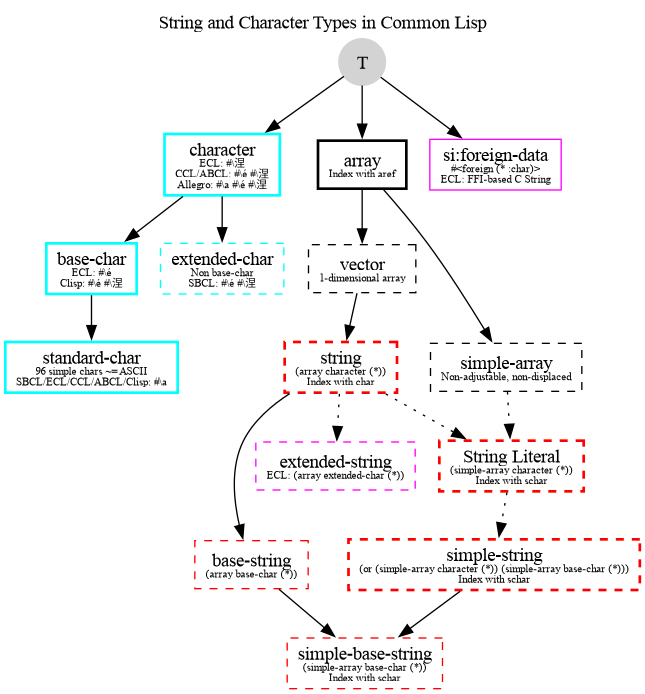
String and character types hierarchy
Solid nodes are concrete types, while dashed ones are type aliases. For
example, 'string is an alias for an array of characters of any size,
(array character (*)).