Numbers in Lisp
Common Lisp has a rich set of numerical types, including integer, rational, floating point, and complex.
Introduction
Integer types
Common Lisp provides a true integer type, called bignum, limited only by the
total memory available (not the machine word size). For example this would
overflow a 64 bit integer by some way:
* (expt 2 200)
1606938044258990275541962092341162602522202993782792835301376
For efficiency, integers can be limited to a fixed number of bits,
called a fixnum type. The range of integers which can be represented
is given by:
* most-positive-fixnum
4611686018427387903
* most-negative-fixnum
-4611686018427387904
Functions which operate on or evaluate to integers include:
isqrt, which returns the greatest integer less than or equal to the exact positive square root of natural.
* (isqrt 10)
3
* (isqrt 4)
2
Like other low-level programming languages, Common Lisp provides literal representation for hexadecimals and other radixes up to 36. For example:
* #xFF
255
* #2r1010
10
* #4r33
15
* #8r11
9
* #16rFF
255
* #36rz
35
Rational types
Floating point types
See Common Lisp the Language, 2nd Edition, section 2.1.3.
Floating point types attempt to represent the continuous real numbers using a finite number of bits. This means that many real numbers cannot be represented, but are approximated. This can lead to some nasty surprises, particularly when converting between base-10 and the base-2 internal representation. If you are working with floating point numbers, then reading What Every Computer Scientist Should Know About Floating-Point Arithmetic is highly recommended.
The Common Lisp standard allows for several floating point types. In order of
increasing precision these are: short-float, single-float, double-float, and
long-float. Their precisions are implementation dependent, and it is possible
for an implementation to have only one floating point precision for all types.
The constants short-float-epsilon, single-float-epsilon, double-float-epsilon
and long-float-epsilon give a measure of the precision of the floating point
types, and are implementation dependent.
ECL specifically bases its long-float on C’s long double, and thus
has higher precision:
CL-USER> (lisp-implementation-type)
"SBCL"
CL-USER> most-positive-single-float
3.4028235e38
CL-USER> most-positive-double-float
1.7976931348623157d308
CL-USER> most-positive-long-float
1.189731495357231765l4932
- Floating point literals
When reading floating point numbers, the default type is set by the special variable
*read-default-float-format*. By default this isSINGLE-FLOAT, so if you want to ensure that a number is read as double precision then put ad0suffix at the end* (type-of 1.24) SINGLE-FLOAT * (type-of 1.24d0) DOUBLE-FLOATOther suffixes are
s(short),f(single float),d(double float),l(long float) ande(default; usually single float).The default type can be changed, but note that this may break packages which assume
single-floattype.* (setq *read-default-float-format* 'double-float) * (type-of 1.24) DOUBLE-FLOATNote that unlike in some languages, appending a single decimal point to the end of a number does not make it a float:
* (type-of 10.) (INTEGER 0 4611686018427387903) * (type-of 10.0) SINGLE-FLOAT - Floating point errors
If the result of a floating point calculation is too large then a floating point overflow occurs. By default in SBCL (and other implementations) this results in an error condition:
* (exp 1000)
; Evaluation aborted on #<FLOATING-POINT-OVERFLOW {10041720B3}>.
The error can be handled, or this behaviour can be changed.
Complex types
There are 5 types of complex number: The real and imaginary parts must be of the same type, and can be rational, or one of the floating point types (short, single, double or long).
Complex values can be created using the #C reader macro or the function
complex. The reader macro does not allow the use of expressions as real and
imaginary parts:
* #C(1 1)
#C(1 1)

* #C((+ 1 2) 5)
; Evaluation aborted on #<TYPE-ERROR expected-type: REAL datum: (+ 1 2)>.

* (complex (+ 1 2) 5)
#C(3 5)
The real and imaginary parts of a complex number can be extracted using
realpart and imagpart:
* (realpart #C(7 9))
7
* (imagpart #C(4.2 9.5))
9.5
Reading numbers from strings
The parse-integer function reads an integer from a string.
The parse-number library cannot evaluate arbitrary expressions, so it should be safer to use on untrusted input. It can also parse floats.
* (ql:quickload :parse-number)
* (use-package :parse-number)

* (parse-number "23.4e2")
2340.0
6
Converting numbers
Most numerical functions automatically convert types as needed. The coerce
function converts objects from one type to another, including numeric types.
Convert float to rational
The rational and rationalize functions convert a real numeric argument into a
rational. rational assumes that floating point arguments are exact; rationalize
exploits the fact that floating point numbers are only exact to their
precision, so can often find a simpler rational number.
Convert rational to integer
If the result of a calculation is a rational number where the numerator is a multiple of the denominator, then it is automatically converted to an integer:
* (type-of (* 1/2 4))
(INTEGER 0 4611686018427387903)
Rounding floating-point and rational numbers
The ceiling, floor, round and truncate functions convert floating point or
rational numbers to integers. The difference between the result and the input
is returned as the second value, so that the input is the sum of the two
outputs.
* (ceiling 1.42)
2
-0.58000004

* (floor 1.42)
1
0.41999996

* (round 1.42)
1
0.41999996

* (truncate 1.42)
1
0.41999996
There is a difference between floor and truncate for negative numbers:
* (truncate -1.42)
-1
-0.41999996

* (floor -1.42)
-2
0.58000004

* (ceiling -1.42)
-1
-0.41999996
Similar functions fceiling, ffloor, fround and ftruncate return
the result as floating point, of the same type as their argument.
Comparing numbers
See Common Lisp the Language, 2nd Edition, Section 12.3.
The = predicate returns T if all arguments are numerically equal. Note that
comparison of floating point numbers includes some margin for error, due to the
fact that they cannot represent all real numbers and accumulate errors.
Working with Roman numerals
The format function can convert numbers to roman numerals with the
~@r directive:
* (format nil "~@r" 42)
"XLII"
We could use this to find which year from this century has the longest representation in Roman numerals.
(iter (for year from 2000 to 2026)
      (finding year maximizing (length (format nil "~@r" year))))
There is a gist by tormaroe for reading roman numerals.
Generating random numbers
The random function generates either integer or floating point random
numbers, depending on the type of its argument.
* (random 10)
7

* (type-of (random 10))
(INTEGER 0 4611686018427387903)
* (type-of (random 10.0))
SINGLE-FLOAT
* (type-of (random 10d0))
DOUBLE-FLOAT
In SBCL a Mersenne Twister pseudo-random number generator is used. See section 7.13 of the SBCL manual for details.
The random seed is stored in *random-state* whose internal representation is
implementation dependent. The function make-random-state can be used to make
new random states, or copy existing states.
To use the same set of random numbers multiple times, (make-random-state nil)
makes a copy of the current *random-state*:
(dotimes (i 8)
  (let ((*random-state* (make-random-state nil)))
    (print (iter (for j below 8)
                 (collect (random 8))))))
This generates 8 random numbers in a loop, but each time the sequence is the
same because the *random-state* special variable is dynamically bound to a copy
of its state before the let form.
Bit-wise Operation
Common Lisp also provides many functions to perform bit-wise arithmetic operations. Some commonly used ones are listed below, together with their C/C++ equivalence.
| Common Lisp | C/C++ | Description |
|---|---|---|
| (logior a b c) | a & b & c |
Bit-wise OR |
| (lognot a) | ~a |
Bit-wise NOT |
| (logxor a b c) | a ^ b ^ c |
Bit-wise exclusive (XOR) |
| (ash a 3) | a << 3 |
Bit-wise left shift |
| (ash a -3) | a >> 3 |
Bit-wise right shift |
Negative numbers are treated as twos complements. We deal with this in the section of the course on NAND2Tetris
For example:
* (logior 1 2 4 8)
15
;; Explanation:
;;   0001
;;   0010
;;   0100
;; | 1000
;; -------
;;   1111

* (logand 2 -3 4)
0

;; Explanation:
;;   0010 (2)
;;   1101 (two's complement of -3)
;; & 0100 (4)
;; -------
;;   0000

* (logxor 1 3 7 15)
10

;; Explanation:
;;   0001
;;   0011
;;   0111
;; ^ 1111
;; -------
;;   1010

* (lognot -1)
0
;; Explanation:
;;   11 -> 00

* (lognot -3)
2
;;   101 -> 010

* (ash 3 2)
12
;; Explanation:
;;   11 -> 1100

* (ash -5 -2)
-2
;; Explanation
;;   11011 -> 110
Please see the CLHS page for a more detailed explanation or other bit-wise functions.
Appendix: the number tower
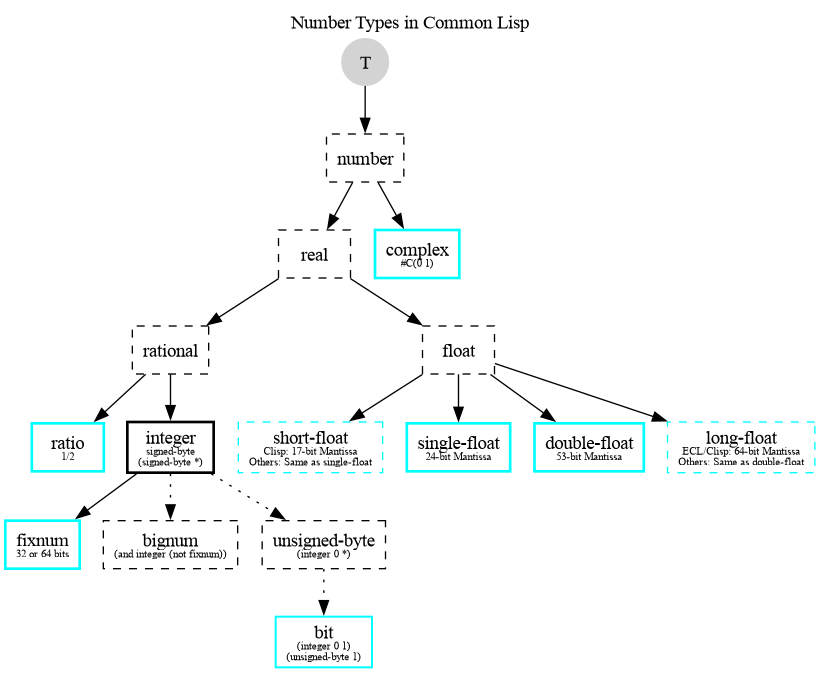
Types in bold, solid boxes are the ones you will typically use.
Sources
Some sources:
- Numbers in Common Lisp the Language, 2nd Edition
- Numbers, Characters and Strings in Practical Common Lisp